Bandaro Power Point Template
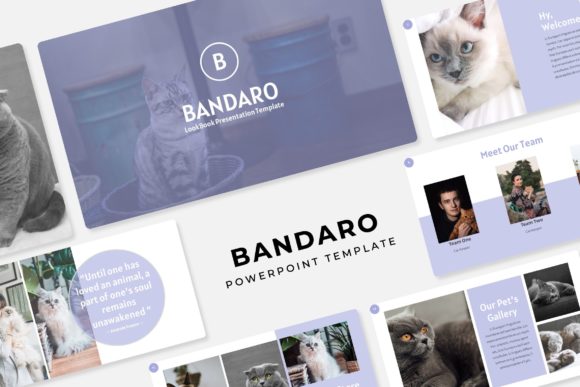
Elevate your next presentation from standard to stunning with a template designed for maximum impact and minimal fuss. The Bandaro Power Point Template is a comprehensive creative toolkit built for professionals who need to communicate ideas with clarity and visual polish. It moves beyond basic layouts, offering a structured yet flexible system that saves you hours of design work while ensuring your slides look consistently professional.
At its core, this presentation template is built for versatility and efficiency. It includes an impressive 150+ total slides, meticulously organized across 5 premade color themes. Each color variation contains 30 unique slides, giving you a robust foundation for any type of presentation, from corporate reports and investor pitches to creative portfolios and educational workshops. This structure eliminates the guesswork of starting from a blank slide, allowing you to focus on your content.
Key Features for a Polished Presentation
What makes Bandaro a standout choice for designers and creators? The features are tailored to streamline the design process while upholding high aesthetic standards:
- Handcrafted Infographics: Transform complex data into clear, engaging visual stories. These custom-designed charts, graphs, and diagrams are integrated directly into the template, saving you the effort of building them from scratch.
- Pixel-Perfect Illustrations: Each graphic element is crafted with attention to detail, ensuring your slides have a cohesive and premium look that generic templates often lack.
- Smart Editing Tools: The template is based on Master Slides, which means global changes to fonts, colors, or logos can be applied instantly across your entire deck. Picture placeholders are fully resizable and editable, with a simple drag-and-drop functionality for inserting your own images.
- Dedicated Slide Types: Purpose-built section break slides, gallery layouts, and portfolio slides make it easy to structure your narrative and showcase work effectively.
Ideal Use Cases and Creative Applications
Considering the Bandaro Power Point Template for your project? Its design flexibility makes it suitable for a wide range of creative and professional scenarios. It’s an excellent asset for developing a strong brand identity, where visual consistency across presentations is key. The clean, modern typography and structured layouts can also inform broader design assets, from social media graphics to digital product mockups.
Think of it as more than just a slide deck. The underlying design principles—clear hierarchy, balanced composition, and thoughtful use of space—are the same ones that guide effective logo design, editorial layouts, and even web design. The included font choices (with free download links provided) are selected to complement the template’s modern aesthetic, offering a starting point for cohesive font pairing across your other materials.
Tips for Choosing and Using the Template
When evaluating any design asset, including a premium presentation template, consider these practical points:
- Match the Mood: Does the template’s visual style align with your project’s tone? Bandaro’s clean lines and professional color themes are ideal for corporate, tech, and creative agency contexts.
- Check the Flexibility: Can you easily customize it? The master slide system and editable graphics in Bandaro ensure you can adapt it to your specific content without losing design integrity.
- Consider the Workflow: Features like drag-and-drop image placeholders and pre-built infographics directly impact how quickly you can assemble a high-quality presentation.
Ultimately, the right design assets empower you to produce work that feels intentional and polished. A well-structured template like Bandaro provides the framework, so you can invest your energy in crafting a compelling message. Whether you’re preparing a critical business proposal or a creative portfolio review, starting with a strong visual foundation makes all the difference in how your ideas are received and remembered.